Posting an eggDrop

To post an eggDrop there are 2 simple steps:
1. Add photos to the eggDrop staging area.
2. Post the eggDrop.
A photo can be added to eggDrop by double clicking the ✓ button when hovering over a photo (or when in fullscreen mode). A yellow asterisk with a blue background will appear in the top corner of the photo to indicate it has been added to the eggDrop staging area.
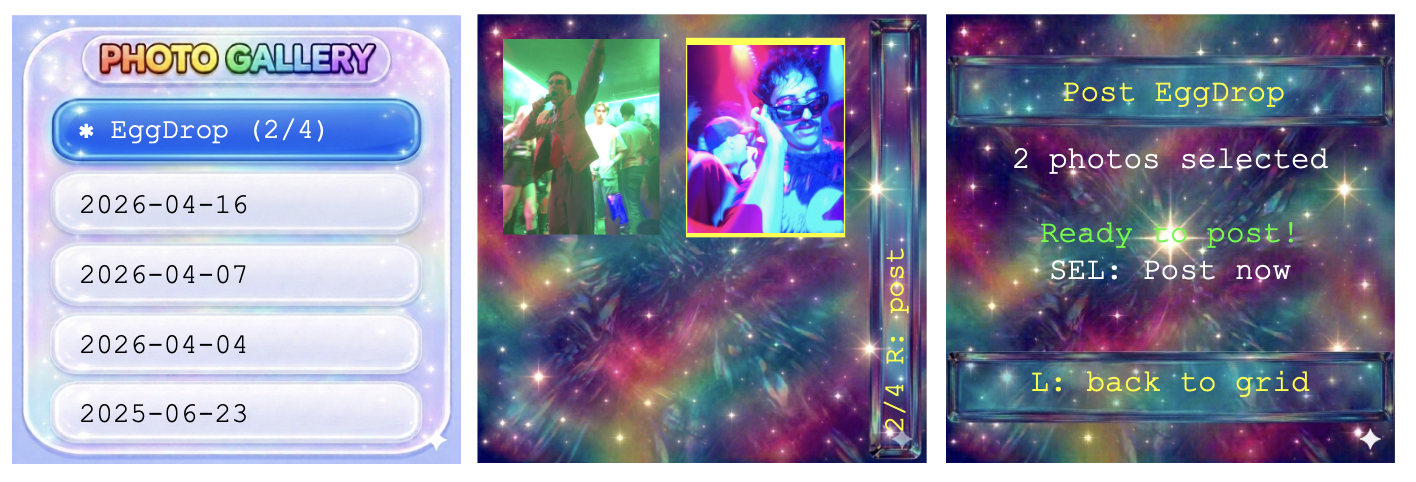
At the top of the list of dates in gallery, there is a folder called "EggDrop" -- this is the eggDrop staging area. Click on the eggDrop folder to view the photos you have added to the eggDrop staging area. To post an eggDrop, scroll to the last photo in the eggDrop gallery, then press the R button. This will take you to the post eggDrop screen. Press the ✓ button to post your eggDrop.
Note: You may only post one eggDrop every 24 hours. Each eggDrop only stays visible to your friends for 24 hours.
If you're getting errors when trying to post an eggDrop, check your WiFi connectivity or try reconnecting to the WiFi.